What is Autolend?
Autolend is an automated tool that allows you to build loan portfolios in accordance with your investment objectives and criteria. Importantly, this means you can easily diversify your risk by spreading your investment across many borrowers and loans.
How Autolend works
Once you define your investment criteria, for example by adding your minimum and maximum target interest rates and/ or the maximum amount to commit to any one borrower, the system continuously monitors the primary and secondary markets to place bids on your behalf. This ensures that your capital is deployed fairly and efficiently, prioritizing diversification by spreading your funds across numerous loans to mitigate individual risk.
The system is particularly effective at managing repayments, creating a seamless reinvestment loop. As borrowers pay back principal and interest, those funds are instantly credited to your account and immediately queued for the next available loan that matches your settings. This “set-it-and-forget-it” mechanism minimizes the time your money sits earning zero interest, allowing you to benefit from the power of compounding without the need for manual oversight.
What activates Autolend to invest in a loan?
Autolend is activated to invest on both a “push” and a “pull” basis, subject to demand as explained below.
By push, we mean it will invest when an Autolend portfolio is created or updated, as well as when
new money is added to your investor account (e.g. through a deposit, ISA transfer or the repayment of a loan) where a loan is available.
By pull, we mean it will invest when a new loan requests funding on the primary marketplace or another investor lists loan parts for sale on the secondary marketplace. For this to happen, you must have available funds in your account.
How does Autolend decide in what order to lend?
When Autolend is activated by a “push” signal it will search the primary and secondary marketplace to find loan parts that fit the criteria you have entered. In each marketplace it will rank available and eligible loan parts from the earliest listed to the latest listed and will start investing in that order.
When it is activated by a “pull” signal it will first check whether the new loan available for investment
or loan parts available for sale fulfill the criteria you have set. If they do, it will invest in those loans or loan parts.
What if there is too much demand for a loan?
Historically, if there was too much demand for a loan based on the criteria investors set, Autolend ranked orders according to portfolio size, giving priority to smaller portfolios. While this was designed to protect smaller portfolios, it often resulted in their funds being instantly deployed into smaller loan fractions, preventing them from accumulating sufficient cash reserves to invest in larger loan parts.
To ensure a fairer, more balanced distribution of loan parts across all our investors, we have moved to a time-based queue system. Autolend priority is now determined by the date and time a portfolio last successfully invested. Under this updated system, the portfolios that have waited the longest since their last automated investment automatically move to the front of the queue, regardless of their total size. Please note that an Autolend transaction will still only execute if your portfolio has sufficient cleared funds and the available loan parts fall strictly within your specific Autolend parameters.
What else do I need to know about Autolend?
While Autolend will allocate loans according to your minimum and maximum interest thresholds if you choose interest as a parameter, you may not get that return. The interest rate shown is the interest rate due to the lender if the borrower makes all payments on time and in full. However, when considering your overall return from investing in Lendwise loans, you should take into account our current expected default rate, as well as your personal tax rate. That means what you receive might be less, particularly if the loan Autolend invests in through your portfolio goes into default.
You can find out more about the current expected default rate here and historical default rates here. Remember that past performance is not an indicator of future performance. While we do our best to accurately estimate the expected default rate, this fluctuates in line with factors outside of our control and your capital and interest are at risk if the borrower defaults.
Details of the credit risk assessment we undertake on borrowers can be found here.
We categorise all our loans into a single risk category because all the loans we offer are personal, unsecured, education-related loans to individuals for a fixed amount with a fixed interest rate denominated in British Pounds. You can find out more about what this means in our Outcomes Statement, which you can access here.
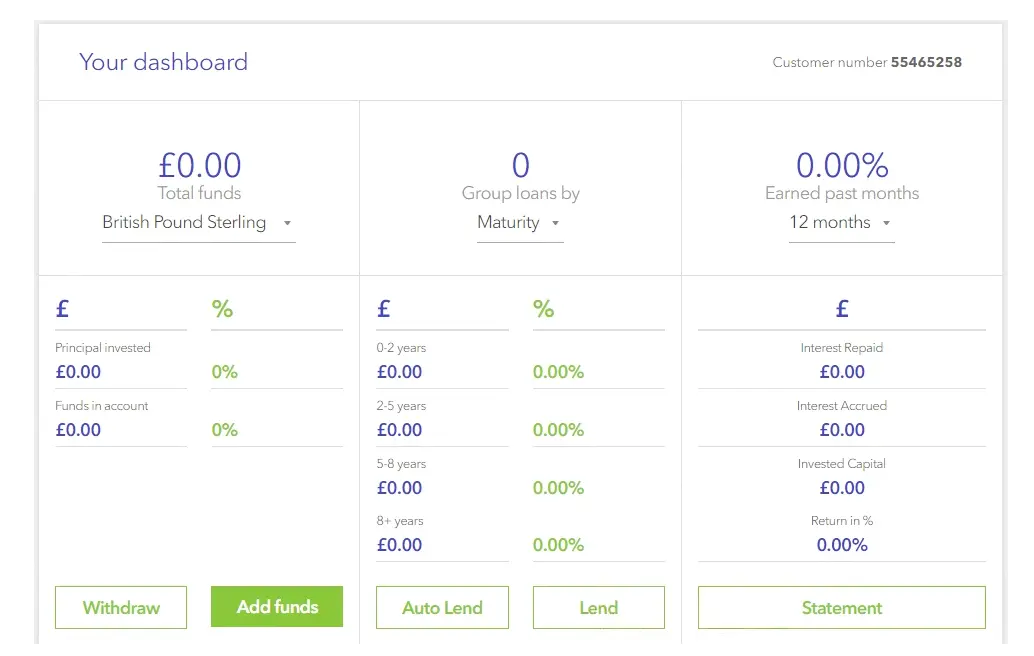
AutoLend is accessible as a main menu link on the top of every page on the site (once you are logged in as a Lender member), and/or through your dashboard.

and/or through your dashboard,
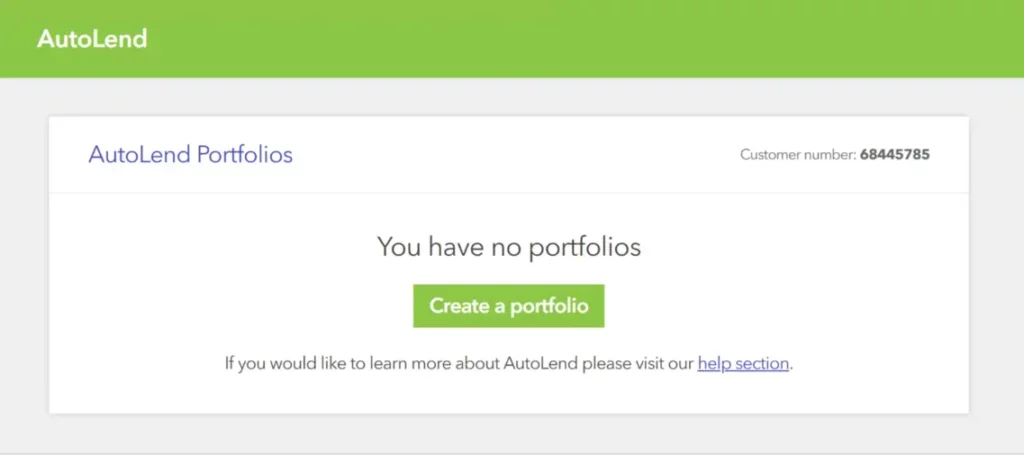
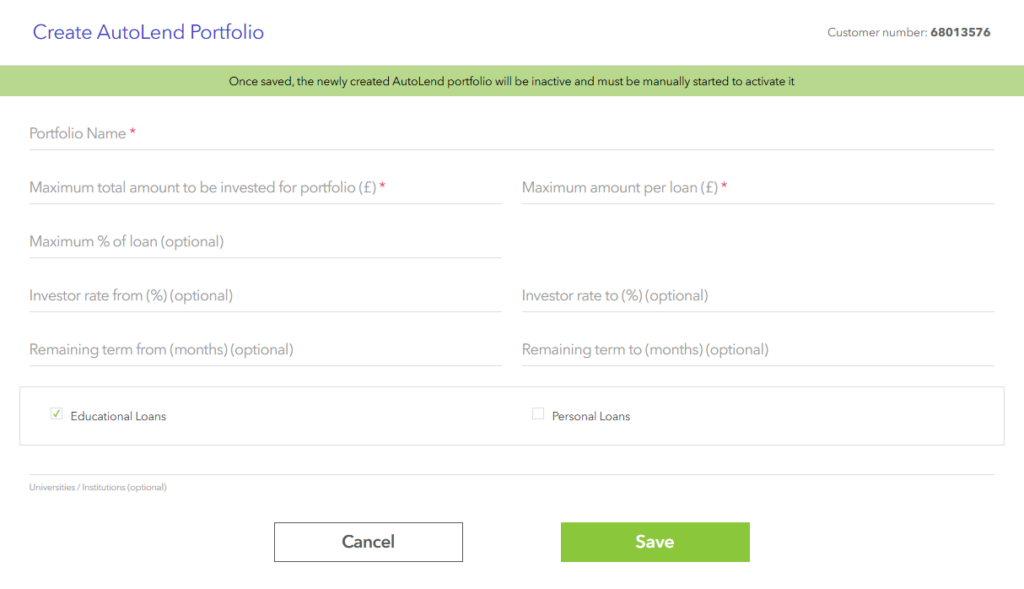
When accessing the AutoLend tool you’ll be prompted to create a new AutoLend Portfolio (if you don’t have any existing ones). If you have existing AutoLend portfolios only one can be active at any time. Please note that each AutoLend Portfolio that you set up, will be independent of your previous investments. In addition, both primary and secondary loan listings on the Platform are eligible for AutoLend Portfolio selection.
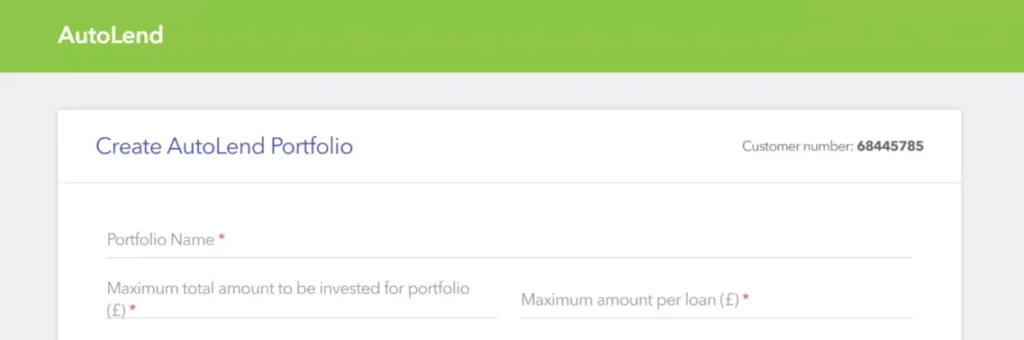
You can name your AutoLend Portfolio as you like (many Lenders use the main selection criteria they use as names). Your AutoLend Portfolios are unique and only visible to you.
To build an AutoLend Portfolio you specify the maximum amount of money that you wish to invest through the specific lending strategy.
This can exceed the amount of funds that you have in your Lendwise account, and if this is the case, the AutoLend strategy will pause once there are no available funds and restart automatically when you transfer additional funds, or your available funds increase from loan repayments.
You also need to specify the maximum amount that will be invested in each individual loan.
You may then proceed to customise your AutoLend strategy by selecting optional parameters such as Minimum or Maximum Interest Rate, Remaining Term, and Universities.
If the eligible loans that are currently available are less than the amount of the AutoLend strategy, then the AutoLend strategy will pause and restart when eligible loans become available on the Platform.
Once you are satisfied with the selection criteria of your AutoLend strategy you can proceed to save, and it will activate.
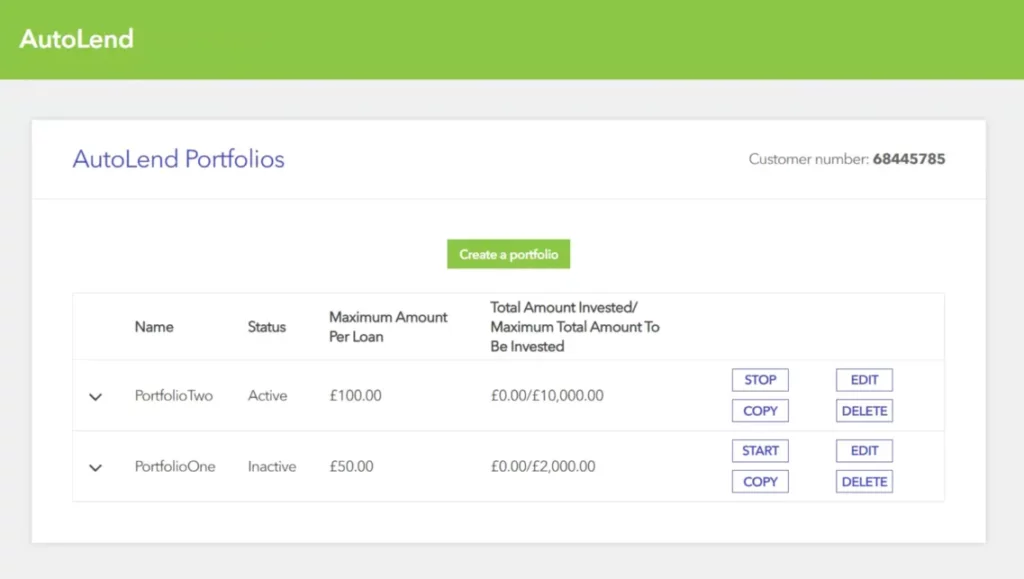
From the AutoLend page you can see your AutoLend portfolios, their status, their progress in terms of investment and you can edit them, pause them, delete them or copy them into new AutoLend portfolios.